
Systematic debugging replaces chaotic trial-and-error edits with scientific binary search isolation: reproducing the failure reliably, testing data state halfway through execution, shrinking noisy inputs into a minimal reproducer, and forming one falsifiable hypothesis at a time before writing a permanent regression test.
The 2 AM Lab Nightmare: Why Guess-and-Patch Multiplies Bugs
Picture yourself staring at your laptop screen at 1:45 AM in your college dorm two hours before a Data Structures or Systems Programming lab submission locks. A 400-line C++, Python, or Java assignment crashes with a cryptic Segmentation fault (core dumped) or returns off-by-one answers on Hidden Test Case #7.
What do 90% of panicked students do next? They dive straight into the editor and start mutating things randomly: changing < to <= on line 118, adding a hasty + 1 on line 245, slapping a try/except over a null pointer, and re-running the entire test harness—only to watch Test Case #2 break while Test Case #7 still fails! Within forty minutes, nobody on Earth knows which of five random tweaks broke what.
Experienced systems engineers debug two to five times faster not because they possess superhuman pattern vision, but because they treat debugging strictly like a **laboratory physics experiment**: narrow the search space exponentially, strip away irrelevant noise, and change strictly **one hypothesis per run**.
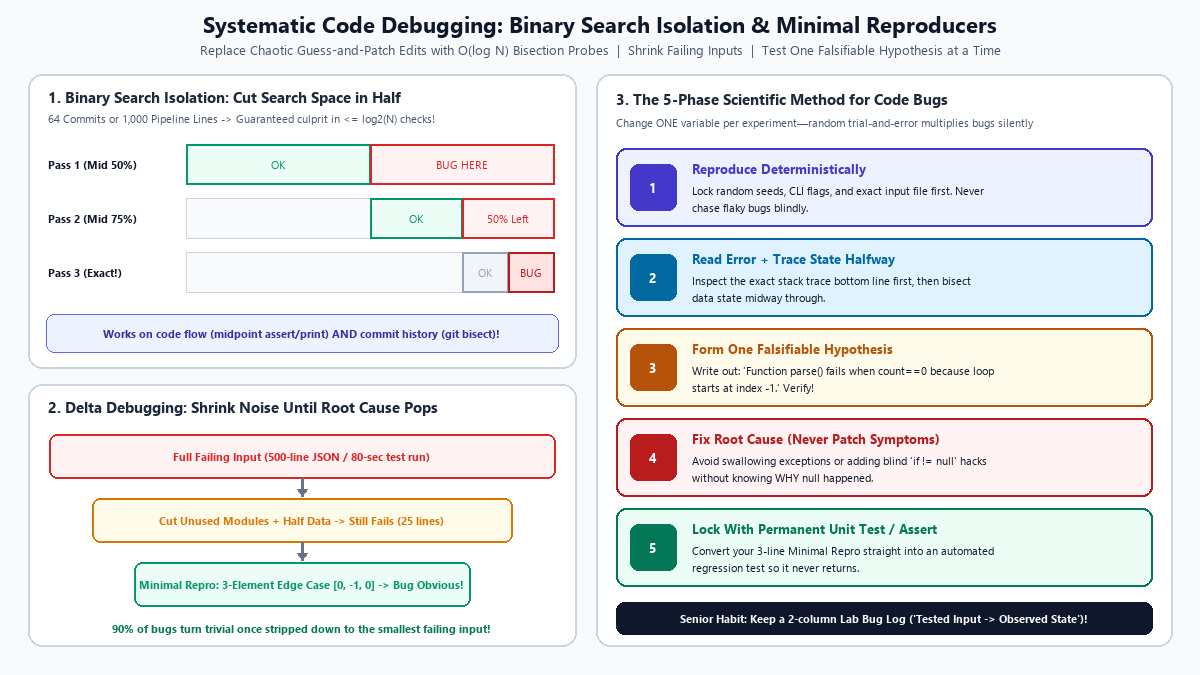
The Binary Search Rule: Cut Your Code Search Space in Half
Whether a bug hides somewhere inside 800 lines of data-pipeline functions or broke cleanly somewhere across 64 recent Git commits, linear line-by-line staring wastes immense time. Computer scientists already solved linear scanning decades ago: **Binary Search runs in \(O(\log_2 N)\)**!
Apply **Bisection Isolation** in two places right away:
- Bisecting Runtime Execution State: Pick the literal 50% midpoint of your program's execution flow (`Input -> Stage A -> Midpoint -> Stage B -> Output`) and inspect every variable or invariant right there (via debugger breakpoint or crisp assertion check).
- If variables at the 50% midpoint ALREADY look corrupted, throw away the bottom half completely—the bug lives strictly inside the top half!
- If variables at the 50% midpoint match ground truth 100%, never stare at lines 1–400 again—immediately probe the **75% mark** inside the bottom half! Even across a 1,000-line pipeline, ten halving checks isolate the exact offending function unconditionally.
- Bisecting Version History with
git bisect: When a capstone codebase worked cleanly three days ago and suddenly broke across 64 commits:git bisect start→git bisect bad HEAD→git bisect good <old-working-hash>
Git automatically checks out the middle commit for you to test! Answering `good` or `bad` six times pins down the exact single commit—and exact diff—that introduced the bug without manually reading a single unrelated change.
The Cardinal Debugging Rule (Print State, Not "Here 1 / Here 2"): Never waste runs typing useless markers like
print("reached here!"). Print the exact variable name, length, data type, and input edge values (`print(f"[mid] i={i}, len={len(arr)}, head={arr[:3]}")`) so every single diagnostic run falsifies concrete assumptions.
| Bug Symptom Pattern | Panicked Guess Habit (Slow) | Systematic Engineering Move (Fast) | Prevention / Permanent Guard |
|---|---|---|---|
| Wrong Numerical Output | Tweak +1 / -1 loop bounds blindly |
Trace 3-element edge input by hand vs midpoint state | Write boundary unit test (`empty`, `len=1`, duplicate) |
| NullPointer / KeyError | Wrap failing line in empty try/catch |
Walk stack trace upward to ask WHY variable stayed null | Enforce strict non-null invariants at module entry |
| Code Broke Since Last Week | Read 40 modified files manually | Run git bisect across commits (`O(log N)` tests) |
Keep commits small & atomic per single feature |
| Works Small, Crashes Large | Stare at syntax typos | Shrink failing input cleanly via Delta Debugging | Check integer overflow, stack recursion depth & Big-O |
Delta Debugging: Shrinking Failing Inputs to a Minimal Repro
Imagine a grader feed drops a massive 500-line JSON graph test case onto your Dijkstra assignment and reports "Incorrect path cost." Trying to hand-trace 500 graph edges inside a debugger is torture.
Use **Minimal Reproducible Example (MRE) Shrinking** (formalized by Andreas Zeller as *Delta Debugging*):
- Copy the 500-line failing input into a scratch file `repro.txt`.
- Delete the **bottom half** of entries. Re-run in 0.2 seconds. Still fails? Throw that bottom half permanently! Stopped failing? Keep the bottom half and chop the top half instead.
- Eliminate unrelated helper flags, network delays, or database mocks until you hold the tiniest possible failure—say a **3-node cycle with zero edge weight**: `[0 -> 1 (0), 1 -> 2 (-1)]`.
Nine times out of ten, the instant a bug shrinks down to a 4-line input on your screen, your brain spots the broken comparison operator (`dist[u] + w < dist[v]` missing negative-weight handling) in fifteen seconds flat! And bonus: that tiny minimal test case turns effortlessly into an automated test before grading!
Rubber Ducking, Logs & Avoiding "Fix One Bug, Birth Two"
During late-night debugging sessions, human working memory holds only a tiny stack of guesses at once—meaning unlogged trial changes start looping in circles ("Wait, didn't I already try reversing that `if` condition twenty minutes ago?").
- Keep a 2-Column Lab Bug Log: Beside your terminal, jot one tiny line per hypothesis: "Hypothesis: empty array skips sort -> Test: input [] -> Result: passed; NOT root cause." Logging stops circular re-testing cold.
- Read Error Messages From the Bottom Up (Or Root Outward): In Python, read the very last line of the traceback first (`ZeroDivisionError`), then jump cleanly to your own deepest source line (skipping deep standard-library frames). In C++/Java/Rust compiler errors, fix ONLY Error #1 at the top—because errors #2 through #40 are routinely cascading parser confusion caused by a single missing semicolon or brace on line #1!
- Explain Out Loud Before Asking Help: Walk step-by-step through what each line actually executes rather than what you *intended* it to execute (our Rubber Duck Debugging guide covers why vocalizing breaks tunnel vision fast).
If you are documenting tricky lab assignments or debugging tough recursive algorithms, keeping a clean workspace beside your code editor saves massive context switching. Try capturing step-by-step hand-trace state tables using Handwriting Studio, or paste your minimal 15-line repro alongside expected vs. actual output into AIgom AI Tutor to sanity-check boundary assumptions cleanly (all guides align with our Editorial & Verification Policy).
For multi-week software engineering labs and semester projects, track open bugs cleanly as cards (`Repro Captured -> Root Cause Confirmed -> Regression Tested`) on our Study Kanban Board and browse clean Systems reference guides inside Peer College Notes. Pairing systematic debugging with our guides on Intuitive Dynamic Programming and DBMS Indexing & Query Plans sharpens engineering intuition end-to-end.
The 5-Minute Terminal Checklist Before Escalating
Whenever twenty minutes of bisection still leaves you stuck, walk cleanly through this quick four-item sanity check—catching silent environment issues that trip up programming labs weekly:
- Check Are You Editing & Running the Exact Same File? Confirm your terminal
pwd, virtual environment (`which python`), and compiler output binary path (`./a.out`) actually match the file open inside your editor—countless bugs vanish once a stale build artifact or wrong working directory is caught. - Inspect Uninitialized Variables & Types Explicitly: Print types (`type(val)`) and integer widths—for instance, mixing `32-bit int` summation with `10^9 * 10^9` inputs in C++ overflows silently while Java `==` compares object pointers instead of strings (
.equals()). - Flush Buffered Output Streams Immediately: In C/C++, `printf` buffers stdout in RAM until hitting a newline or clean exit, making programs appear to crash before earlier print statements even though execution crashed afterward! Use `stderr` or append `\n` / `fflush(stdout)`.
Frequently Asked Questions
Why is using a proper IDE debugger often better than print statements?
Interactive breakpoints in VS Code, GDB, or PyCharm let you inspect the entire call stack, every local dictionary, memory addresses, and conditional expressions dynamically at zero re-compile cost—though clean structured print logs still shine on distributed async race conditions and tight multi-thousand-iteration loops.
What should I do when a bug vanishes whenever I add print statements ("Heisenbug")?
A bug that disappears under instrumentation almost always signals timing race conditions (multiple threads mutating shared memory without mutexes) or uninitialized memory / undefined behavior in C/C++. Run thread/address sanitizers (`gcc -fsanitize=address,undefined` or `-fsanitize=thread`) immediately instead of print lines.
Why does reading compiler errors from the top down save time in C++ and Java?
Early syntax slips—like a missing closing brace or unclosed template angle bracket—desynchronize the compiler's parser for the next fifty lines, producing dozens of fake cascade errors. Fixing the single top-most error and recompiling frequently wipes out 90% of downstream warnings cleanly.
How long should I struggle alone before asking a TA or AI assistant for help?
Spend 20 focused minutes isolating a **Minimal Repro + Exact Expected vs. Actual Output + 2 Ruled-Out Hypotheses**. Showing up with a crisp 10-line minimal repro gets your bug solved in two minutes instead of confusing everyone with a broken 500-line screenshot.
Why shouldn't I delete or hide error checks just to pass a sample test?
Swallowing exceptions silently or hardcoding special-case patches covers symptoms while corrupting downstream data silently—causing far harder failures on hidden grading suites. Always verify the exact upstream invariant broken before editing logic.
Debug Like an Engineer, Not a Gambler
Once you trade frantic midnight trial edits for `O(log N)` bisection checks, minimal input shrinking, and single-variable hypotheses, bugs stop feeling mysterious and turn into quick puzzles. Open Etudey to organize your programming notes and bug postmortems cleanly, and turn every tough assignment failure into permanent engineering intuition.