
Virtual memory isolates every running process inside its own clean, contiguous address space while allowing the OS kernel to scatter physical pages across RAM or disk swap. Using page tables, fast TLB hardware caches, and on-demand page fault handling, systems achieve process security without sacrificing translation speed.
The Hotel Keycard Analogy: Why Programs Never Touch Real Physical RAM
Suppose two classmates open two identical copies of Chrome, a Python script, and VS Code simultaneously on an 8 GB student laptop. Every compiled C or Rust binary thinks its `main()` code lives neatly at virtual address `0x00400000` and its heap grows upward cleanly—yet physically inside DRAM, two programs obviously cannot occupy the exact same silicon capacitor cell `0x00400000` at the same instant!
If applications accessed physical RAM addresses directly, two nightmares would occur constantly: one buggy pointer dereference in an undergraduate C lab would overwrite operating-system kernel memory instantly, and any app larger than free contiguous RAM fragments would fail to launch.
**Virtual Memory** solves both nightmares with one hardware indirection: every pointer inside your code holds a private **Virtual Address**. Hardware inside the CPU (**MMU — Memory Management Unit**) secretly translates each Virtual Address on every instruction fetch and data load into a **Physical RAM Frame**—just like a hotel front desk translating `"Room Name: Penthouse"` on a keycard into physical floor and room numbers dynamically behind the scenes!
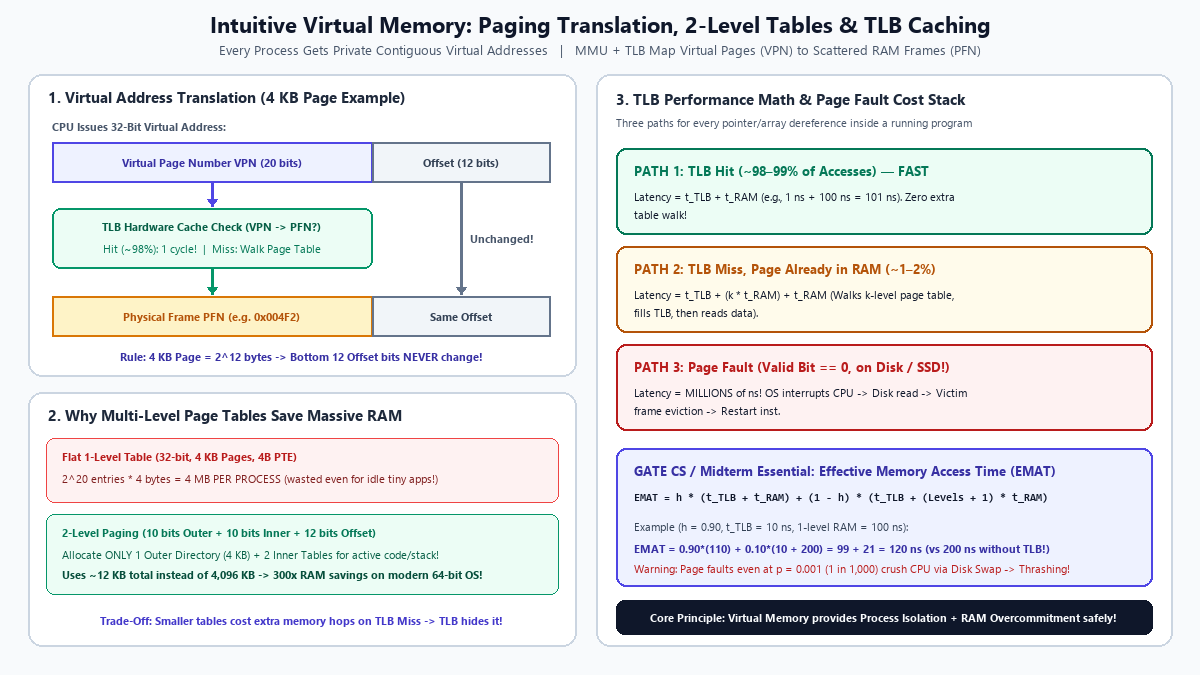
Decoding Address Translation: VPN, Page Offset & Page Size Math
Operating Systems midterms and GATE CS exams almost always start with bit-splitting calculations. Mastering three tiny rules makes every virtual-to-physical bit math problem effortless:
- Page Offset Bits Depend Strictly on Page Size: A standard `4 KB` page equals \(4 \times 1024 = 2^{12}\text{ bytes}\). Addressing one specific byte inside that `4 KB` page requires **`12 bits`** (`log2(4096)`). Notice a crucial rule shown in Figure 1, Panel 1: those bottom 12 Offset bits copy straight through into the Physical Address completely unchanged!
- Virtual Page Number (VPN) Uses All Remaining Top Virtual Bits: On a `32-bit` architecture (`2^32 = 4 GB` virtual space) with `4 KB` pages, the top \(32 - 12 = \mathbf{20\text{ bits}}\) identify the Virtual Page Number (`2^20 = 1,048,576` possible pages per process).
- Physical Frame Number (PFN) Size Matches Real Installed RAM: If the physical laptop installs only `1 GB` RAM (`2^30` bytes), physical addresses need `30 bits` (`18 bits` PFN + same `12 bits` Offset). Notice Virtual Address width (`32` or `48` bits) never needs to match installed physical RAM width!
Why Multi-Level Page Tables Save Hundreds of Megabytes
Why don't modern Linux or Windows kernels just keep one simple flat array mapping `VPN[0 .. 1,048,575]` straight to `PFN` per process? Calculate the memory bill first!
For one 32-bit process holding `2^20` entries at `4 bytes` per Page Table Entry (PTE), a single flat page table consumes **`4 MB` of contiguous physical RAM per process**—even for a tiny background daemon using just `12 KB` of actual code and stack! Open 200 system processes, and `800 MB` of precious RAM disappears before opening a single browser tab. On `64-bit` (`48-bit` virtual addresses, `2^36` pages), a flat table per process would swallow **terabytes**—impossible!
The solution (**Multi-Level / Hierarchical Page Tables**) borrows directly from sparse directory trees: break the `20-bit VPN` into two `10-bit` levels (`Outer Directory 10 bits | Inner Page Table 10 bits | Offset 12 bits`):
- Allocate ONE small `4 KB` Outer Directory (`1024 entries`) per process at startup.
- Whenever huge blank gaps exist between code (`0x00400000`) and stack (`0x7FFFFFFF`), leave middle Outer entries marked **Invalid / Null**—allocating zero inner page tables for unused virtual holes!
- A small process touching only code and stack allocates just 2 inner tables (`4 KB + 8 KB = 12 KB` total instead of `4,096 KB`!).
The Hidden Latency Trade-Off: Splitting translation into a 2-level (or `4-level` on x86-64!) page table shrinks RAM usage dramatically—yet forces hardware to make 2 to 4 separate slow RAM reads before touching real program data! Hardware rescues performance using a small, ultra-fast associative cache sitting right inside the MMU: the **TLB (Translation Lookaside Buffer)**.
| Hardware / OS Structure | Where It Lives & Typical Size | Lookup Speed | What Happens on a Miss |
|---|---|---|---|
| TLB (Translation Lookaside Buffer) | Inside CPU MMU SRAM (~64–2048 entries) | ~1 CPU cycle (~0.5–1 ns) | Hardware Page Table Walker queries RAM levels |
| Multi-Level Page Table (x86-64: 4/5 Levels) | Per-process kernel pages in Main RAM | ~80–100 ns per tree level | Reads PTE flags (`Valid`, `Dirty`, `RWX` permissions) |
| Page Fault Trap (Disk / Swap Backing) | OS Kernel Trap Handler + SSD/NVMe Swap | ~100,000 to 10,000,000 ns! | Evicts victim frame (Clock/LRU), loads disk block, retries |
TLB Hit Ratio Math & Page Fault Thrashing
Computing **Effective Memory Access Time (EMAT)** with a TLB is one of the highest-yield numerical questions on every Operating Systems midterm. Follow the branching probability cleanly without skipping `t_RAM` on the final data fetch:
\(\text{EMAT} = h \cdot (t_{\text{TLB}} + t_{\text{RAM}}) + (1 - h) \cdot (t_{\text{TLB}} + (k + 1) \, t_{\text{RAM}})\)
Notice `(k + 1)` on a TLB miss: if translation walks a **`k = 2` level page table**, a TLB miss reads Level 1 (`1 * t_RAM`), Level 2 (`1 * t_RAM`), and finally the actual target byte in RAM (`+1 * t_RAM`), totaling 3 DRAM fetches!
Now imagine what happens when a system runs out of physical RAM and processes start fighting over frames—triggering **Page Faults** (`Valid Bit == 0` in the PTE). Because reading a page from SSD or disk takes **millions of nanoseconds** (`10,000x–100,000x` slower than RAM!), even a seemingly tiny `0.1%` page-fault rate drops effective throughput catastrophically! When total active memory pages needed concurrently across processes (their **Working Set**) exceed installed RAM frames, the OS spends 99% of its time swapping pages in and out while CPU utilization collapses toward zero—a meltdown state called **Thrashing**.
Page Replacement & Working Set Exam Rules
- Optimal (Belady's) Replacement: Evict the frame needed farthest in the future—impossible to build physically, yet serves as the theoretical gold standard benchmark on exams.
- LRU vs. Clock (Second-Chance): True **Least Recently Used (LRU)** tracks exact timestamps (`expensive per instruction`), so real OS kernels approximate LRU cleanly using a circular **Clock hand + 1 Reference bit (`R`)** inside each PTE (`if R == 1: clear R=0 and advance; if R == 0: evict!`).
- Dirty Bit (`M`) Optimization: If an evicted page was never modified since loading from disk (`Dirty Bit == 0`), the OS overwrites it immediately without paying a slow disk write-back!
- Watch Out for Belady's Anomaly (FIFO): Weird exam classic: under simple First-In First-Out (**FIFO**), adding more physical RAM frames (`3 -> 4`) can occasionally increase page faults! Stack algorithms like LRU and Optimal never suffer Belady's Anomaly.
Sketching page-replacement trace grids (FIFO vs. LRU vs. Optimal across reference strings) and bit-width split diagrams cleanly by hand turns confusing OS memory questions into quick arithmetic. You can digitize handwritten page-table trees cleanly via Handwriting Studio, or test custom GATE-style EMAT and 2-level table size calculations against your Operating Systems slides inside AIgom AI Tutor (all platform guides follow our Editorial & Verification Policy).
Keep core OS milestones—CPU Scheduling, Deadlocks, Virtual Memory Paging, and File Systems—organized clearly on the Study Kanban Board alongside shared reference notes inside Peer College Notes. Connecting virtual memory hardware straight to our guides on CPU Pipelining & Cache Locality and OS Deadlocks & Concurrency unifies Systems preparation from CPU caches all the way to kernel synchronization.
Frequently Asked Questions
Why don't page offset bits ever change during Virtual-to-Physical translation?
Virtual pages and physical frames have identical byte sizes (for example, `4 KB = 4,096` bytes). Because every byte inside a page maps one-to-one in exact order inside its physical frame, the offset inside the page (`bottom log2(page_size) bits`) remains identical regardless of which RAM frame holds the page.
What triggers a Segmentation Fault vs. a Page Fault?
A **Page Fault** happens normally when a valid virtual memory region simply isn't sitting in physical RAM yet (first touch on `malloc` or swapped to disk)—the OS loads a frame cleanly and resumes execution. A **Segmentation Fault (`SIGSEGV`)** occurs when code touches an invalid/unmapped address or violates permission bits (e.g., writing to read-only code pages).
What must the OS do to the TLB during a process Context Switch?
Because two different processes reuse identical virtual addresses (`0x00400000`) pointing to totally different physical frames, switching processes either flushes non-global TLB entries or relies on hardware **ASIDs (Address Space Identifiers)** tagged inside each TLB entry so stale mappings never leak across processes.
Why do modern OS kernels use Copy-on-Write (CoW) with `fork()`?
When a parent spawns a child via `fork()`, duplicating megabytes of physical RAM immediately wastes time—especially if the child calls `exec()` right away! Instead, the kernel points both virtual page tables to the exact same physical frames marked Read-Only, copying an individual page privately only at the moment either process tries writing to it.
How can an OS cure severe memory thrashing immediately?
Adding faster CPU cores makes thrashing worse; the cure requires reducing total concurrent working-set demand by suspending processes (**Medium-Term Scheduling / Swap-Out**), adjusting per-process frame allocation above its active Working Set threshold, or adding physical RAM.
Turning Memory Architecture Into Instant Exam Points
Once you see virtual addresses as clean `VPN | Offset` masks, hierarchical page tables as sparse directories, and the TLB as the hardware bridge keeping translation near single-cycle speed, every Operating Systems paging derivation locks into place smoothly. Open Etudey with your OS slides today, solve one `3-level` table calculation and one FIFO/LRU trace cleanly on paper, and walk into your exam completely prepared.