
Tutorial Hell is a psychological trap in computer science and programming where students confuse passive code-along syntax reproduction with authentic software engineering competence, leaving them paralyzed the moment they open a blank code editor without step-by-step video instructions holding their hand.
Every computer science undergraduate, bootcamp attendee, and self-taught programmer recognizes the sickening sensation of the blank text editor. You just spent three weeks completing a celebrated 40-hour video course on building full-stack web applications with React, Node.js, and PostgreSQL. You faithfully typed every single line of code the charismatic instructor typed on screen. You debugged their typos, matched their folder hierarchies, and marveled as the final deployed e-commerce application ran flawlessly in your browser.
You felt like a software engineer. You felt ready to build your own portfolio project—perhaps a personalized campus task manager or an automated lab attendance tracker. You opened Visual Studio Code. You created an empty directory. You typed git init. You created index.js or App.tsx.
And then, total, suffocating paralysis set in.
Your hands hovered over the keyboard for twenty minutes without typing a single character. What folder structure do you create first? How do you initialize the database connection without looking at the instructor’s boilerplate? How do you set up CORS headers or state routing? Suddenly, you realize with crushing clarity: you don’t actually know how to build software. You only know how to transcribe someone else’s pre-solved solutions. Desperate and demoralized, you open YouTube or Udemy, search for another “Complete Beginner to Advanced 2026 Masterclass,” and descend straight back into the abyss of Tutorial Hell.
The Cognitive Psychology of Tutorial Hell: The Illusion of Competence
To escape this trap, you must understand the cognitive mechanism that ensnares you. In educational psychology and cognitive science, this phenomenon is governed by The Illusion of Competence and John Sweller’s Cognitive Load Theory.
When you watch an expert instructor build an application on video, your brain operates in pure recognition mode. The instructor has already performed 100% of the agonizing architectural labor before hitting the record button. They already decided how to structure the database schema, which design patterns to employ, which API endpoints to expose, and which package dependencies to install. They have already encountered and resolved forty different edge-case bugs off-camera.
Because the instructor presents a smooth, linear, and logically coherent narrative, your prefrontal cortex experiences high cognitive fluency. The code makes complete sense as you watch it. You mistake that effortless comprehension for operational capability. In reality, recognition memory and generative retrieval memory utilize completely separate neural pathways in the brain:
- Recognition Memory (Passive): Acknowledging that a line of code like
useEffect(() => { fetchUsers(); }, [])makes sense when someone explains its dependency array. - Generative Retrieval Memory (Active): Confronting an asynchronous race condition where stale component state triggers duplicate API requests, diagnosing the bug in the browser developer tools, and architecting an AbortController cleanup function from scratch.
“The hallmark of deliberate practice is that it requires full concentration, cannot be sustained for long periods without fatigue, and involves confronting challenges that exceed one’s current capabilities. If you are comfortable while coding, you are not learning; you are merely performing.” — Dr. K. Anders Ericsson, Peak: Secrets from the New Science of Expertise
Typing along with a tutorial is not programming; it is high-speed typing practice. Real programming is the messy, uncomfortable, non-linear cognitive process of reading documentation, decomposing ambiguity, formulating mental models, and debugging unscripted stack traces.
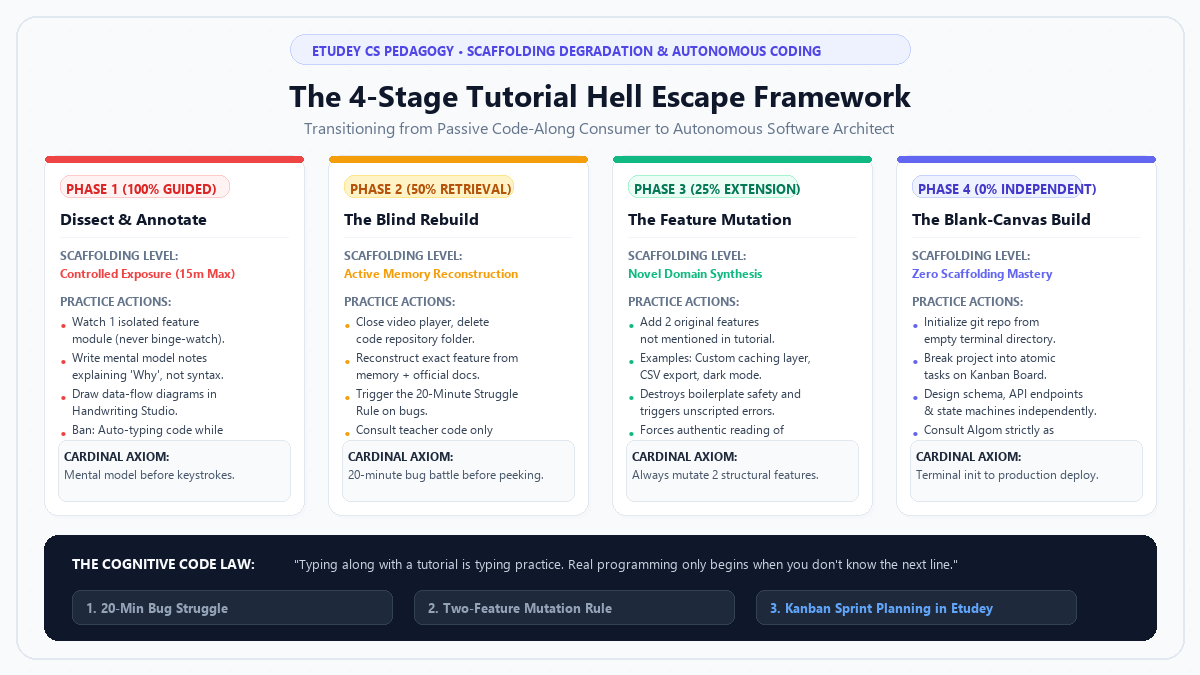
The 4-Stage Scaffolding Removal Protocol
You cannot escape tutorial hell by jumping straight from passive video bingeing to building a distributed microservices architecture on an empty screen. That leap is too wide, leading to overwhelming anxiety and inevitable surrender. Instead, you must apply the cognitive apprenticeship model of Scaffolding Degradation across four distinct, disciplined phases:
Phase 1: Controlled Code-Along Dissection (100% Guidance, 15-Minute Cap)
Tutorials are not evil; the way students consume them is evil. Binge-watching a six-hour coding tutorial like a Netflix drama produces zero retention. Institute the 15-Minute Micro-Module Rule:
- Watch at most 15 minutes of instructional video covering a single, isolated feature (e.g., setting up JWT user authentication or defining a database schema migration).
- While watching, never type code in an open editor. Keep your hands off the keyboard. Put the video in full screen.
- Take conceptual mental-model notes in Etudey Notes or sketch the data-flow pipeline in the Handwriting Studio. Write down why the instructor chose a specific abstraction, which trade-offs were accepted, and what data structure is passing between functions.
Phase 2: The Blind Rebuild & The 20-Minute Struggle Rule (50% Retrieval)
Once the 15-minute module concludes, close the video player. Now open your code editor, delete the code you just wrote, and rebuild the exact same feature from scratch with the video paused and closed:
- Rely solely on your working memory and official language/library documentation (e.g., MDN Web Docs, official React documentation, Python standard library docs).
- When you hit a compilation error or a broken endpoint, do not rush back to the video solution. Enforce The 20-Minute Struggle Rule.
- The 20-Minute Struggle Rule: You must spend a full twenty minutes wrestling with the error on your own. Read the terminal stack trace. Insert
console.logor print debugging statements. Inspect network payloads. Read the official documentation. Only after twenty minutes of deliberate, documented effort are you permitted to peek at the instructor’s repository to conduct a forensic post-mortem on what you missed.
Phase 3: The Two-Feature Mutation Protocol (25% Scaffolding)
Never leave a tutorial project in its default state. A tutorial project on your GitHub that looks identical to 5,000 other student clones is proof of tutorial consumerism, not engineering skill. Before moving on, you must implement The Two-Feature Mutation Rule:
- Feature Mutation A (Data or Algorithmic Modification): Add a non-tutorial data capability. If the tutorial was a recipe blog, add an interactive nutritional calculation engine that dynamically recalculates macro percentages based on serving sizes.
- Feature Mutation B (Infrastructure or State Architecture): Add an architectural feature never mentioned in the course. Implement dark mode persistence using local storage, add automated client-side debouncing on search inputs, or integrate an external third-party API.
Because the instructor never wrote code for these mutations, your safety railing is completely gone. You will encounter unscripted syntax errors, breaking changes, and lifecycle bugs. When you resolve them using official documentation and technical discussion forums, you take your first authentic steps as an autonomous software engineer.
Phase 4: The Blank-Canvas Build (0% Scaffolding)
You are now ready to build an original application from scratch. Open an empty terminal, run git init, and write your first line of architectural code without any video reference. The secret to surviving Phase 4 is breaking the massive project into atomic, bite-sized tasks.
| Engineering Dimension | The Tutorial Consumer | The Copy-Paste Hacker | The Autonomous Software Engineer |
|---|---|---|---|
| Primary Information Source | 10-hour full-stack YouTube clone videos | Stack Overflow snippets & unreviewed forum copy-paste | Official API documentation, RFC specs & source code |
| Reaction to Compiler Errors | Panics, rewinds video to check instructor spelling | Blindly copies error message into search bar | Reads stack trace line numbers, isolates variable state |
| Project Architecture | 100% clone of instructor’s folder layout | Spaghetti code stitched from 8 different blogs | Planned domain modules, state diagrams & schema specs |
| Learning Methodology | Passive video playback on second monitor | Trial-and-error guessing until tests pass | Deliberate practice with progressive scaffolding removal |
| Portfolio Presentation | Generic clone repos (“MERN Netflix Clone”) | Broken, half-finished prototype repos | Production-deployed apps solving personal/campus problems |
| Job Interview Readiness | Freezes on basic whiteboard data structure questions | Struggles to explain why code works or fails | Articulates trade-offs, system architecture & failure modes |
Project Decomposition: How to Tame the Blank Canvas
The primary reason CS students freeze when confronting an empty editor is scope paralysis. They envision the final, polished product—with OAuth logins, real-time WebSockets, microservices, and slick animations—and feel crushed by the sheer magnitude of the work.
Professional engineers never build an entire system at once. They build an ugly, minimal prototype, verify its core assumptions, and iteratively refactor. Use the Etudey Kanban Board to slice your project into atomic vertical slices:
- Milestone 1: The Walking Skeleton (Day 1–2): Build the absolute ugliest possible version that connects your front-end to your back-end. A single button on an unstyled HTML page that sends a POST request to an endpoint and saves a string to a local database. Zero styling. Zero authentication. Just establish the end-to-end data pipeline.
- Milestone 2: The Core CRUD Domain (Day 3–5): Implement the primary operations: Create, Read, Update, Delete for your core data model. Test every endpoint with curl or Postman before writing a single CSS rule.
- Milestone 3: Edge-Case Hardening & Validation (Day 6–8): What happens when a user submits an empty string? What happens when network latency delays a database response? Add input validation schemas, error toast notifications, and loading skeletons.
- Milestone 4: Polish, Testing & Deployment (Day 9–10): Add responsive design layouts, write unit tests for critical business logic, configure environment variables, and deploy to a free cloud hosting tier.
When you look at your Kanban Board and see small, discrete cards like “Write regex validator for student email domain” instead of “Build entire campus app,” the cognitive overwhelm evaporates.
Using AI as a Socratic Mentor, Not a Cheat Code
In 2026, many students escaping video tutorial hell make an even deadlier mistake: they fall into AI Generator Hell. Instead of typing along with a YouTube instructor, they prompt ChatGPT or Claude: “Write me a complete Python script to scrape university exam schedules and send WhatsApp alerts.” They copy the generated block into their editor, click run, and experience the exact same illusion of competence without learning a single fundamental principle.
To build genuine engineering capability, transform your AI into a Socratic Mentor. When working inside AIgom, enforce the following prompt protocol:
“I am an undergraduate software engineering student debugging an issue. Do not write the code for me. Do not provide the corrected function. Instead, analyze my stack trace, explain the underlying conceptual bug, and ask me three Socratic questions to guide my own diagnosis.”
By forcing AIgom to act as a senior staff engineer conducting an interactive design review, you preserve the desirable difficulty necessary to build deep synaptic pathways. You learn how to think, how to deduce, and how to read systems forensically.
Ergonomics of System Architecture & Notes
Before writing code, sketch your architecture. Junior developers open their editor and start writing code immediately; senior engineers spend two days drawing box-and-arrow diagrams on whiteboards before touching a keyboard.
Use the Etudey Handwriting Studio to sketch your database entity-relationship (ER) diagrams, component state hierarchies, and API route trees. Having a clear visual map of how data moves from user input to backend controllers eliminates 80% of architectural re-writes mid-development. Store your project post-mortems, recurring error patterns, and algorithmic optimization notes in Etudey Notes so you never solve the same CORS or async race-condition bug twice.
Frequently Asked Questions
Is it ever okay to watch coding tutorials?
Yes. Tutorials are excellent for high-level syntax orientation when learning an unfamiliar framework or language for the first time (e.g., getting a quick 30-minute overview of Rust ownership syntax or Go goroutine channels). The problem is not watching tutorials; the problem is watching them without executing immediate blind rebuilds and feature mutations.
What kinds of projects should I build to escape tutorial hell?
Build tools that solve personal, immediate annoyances in your daily college life. Don't build another cloned Spotify or generic to-do list. Build a script that scrapes your university mess menu and sends a daily telegram notification, an automated PDF merger that organizes your lab manual screenshots, or a peer-to-peer textbook barter platform for your hostel wing. Real problems generate real edge cases that no tutorial can anticipate.
What should I do when I am completely stuck and documentation doesn't help?
Step away from the screen for 15 minutes. Cognitive scientists call this the diffuse mode of thinking: your subconscious brain continues processing the problem in the background while you walk around, drink water, or shower. If you remain stuck, practice the “Rubber Duck Debugging” technique: explain the problem out loud, line by line, to an inanimate object or an interactive session in AIgom. In 70% of cases, articulating the problem verbally reveals the hidden logical flaw.
How many personal projects do I need to land an engineering internship?
Quality completely eclipses quantity. Two deeply engineered, fully deployed, and well-documented personal projects will beat twenty superficial tutorial clones every single time. Technical hiring managers want to see live deployment links, clean Git commit histories, comprehensive README files detailing architectural trade-offs, and an applicant who can explain every single design decision made in the codebase.
How do I handle the anxiety of feeling like I don't know enough to start?
Accept that feeling incompetent is the baseline condition of professional software engineering. Technology moves too fast for anyone to know everything. The goal of a computer science degree is not to memorize syntax; it is to build the cognitive stamina to confront complex, unfamiliar systems and figure them out systematically. Embrace the confusion as the feeling of your brain growing new neural connections.
Close the Video, Open the Editor, and Build
You will never feel 100% ready to build your first independent project. The feeling of preparedness is an illusion created by comfortable video players. True confidence is not the absence of uncertainty; it is the acquired resilience of knowing you can sit with an empty editor, read the documentation, debug the errors, and bring an idea to life through sheer iterative grit.
Close your tutorial tab right now. Open your Etudey Kanban Board, map out your first four project milestones, and write your first original line of code today. Explore the complete suite of student productivity and learning tools on the Etudey Workspace and take ownership of your engineering journey.